Authorization
Overview
The Channel Manager API transitioned from Basic Authentication to a more secure Bearer Token–based authentication mechanism using Access Tokens and Refresh Tokens. This approach improves security, scalability, and control over token lifecycle management.
Authentication & Token Lifecycle
Initial Token Provisioning
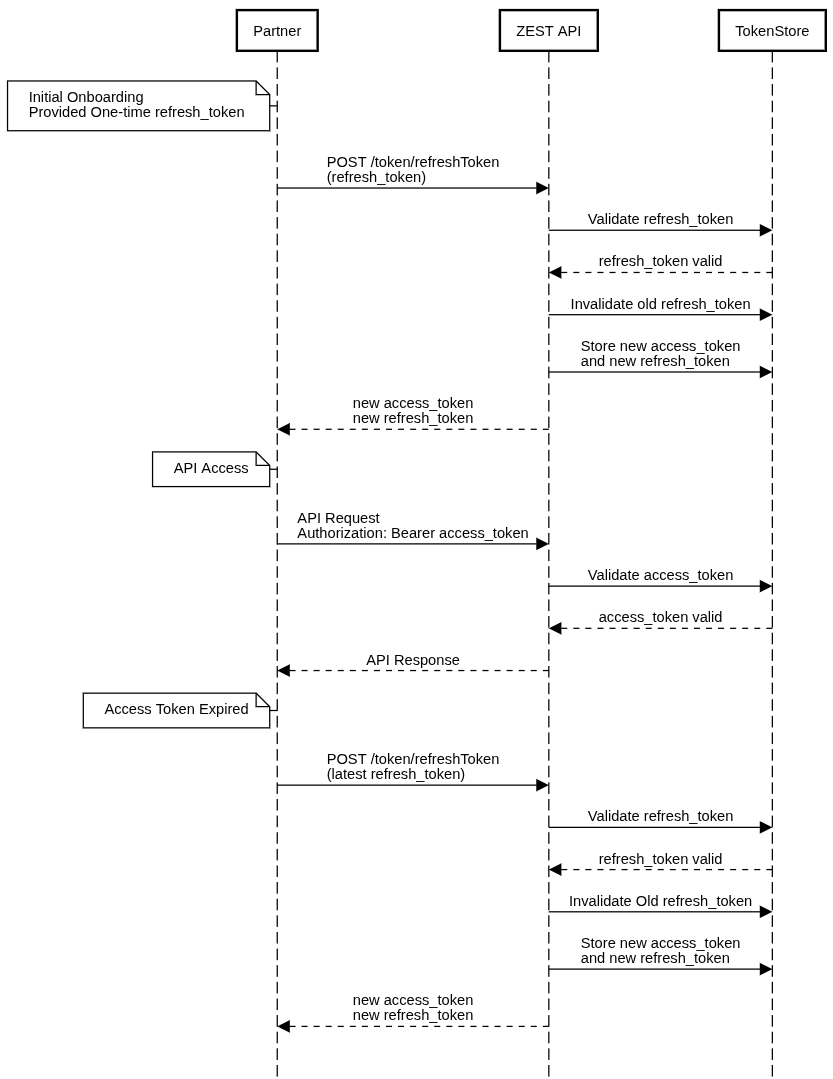
As part of the initial onboarding, the ZEST team provides a one-time refresh_token to the partner.
This token is used to generate:
-
A short-lived
access_token(used for API authorization) -
A new
refresh_token(used for future token renewals)
Note: The refresh token is intended for single use only and will be rotated upon successful token generation.
Token Refresh API
Endpoint:
POST {BASE_URL}/api/{VERSION_NO}/token/refreshToken
Request Body:
{
    "refresh_token": "d4e13c87-a00c-487b-ae8a-615fcb2eacd3"
}
cURL Example:
curl --location 'https://sandbox-cm.zest.golf/api/v5/token/refreshToken' \
--header 'Content-Type: application/json' \
--data '{
    "refresh_token": "d4e13c87-a00c-487b-ae8a-615fcb2eacd3"
}'
Successful Response:
{
    "success": true,
    "data": {
        "access_token": "411500ad-d228-4553-9372-f03caae00bf1",
        "refresh_token": "5fbcde8e-c375-40af-b155-b4a5c4587ead",
        "expires_in": 3600
    }
}
Response Parameters:
-
access_token– Bearer token used to access protected APIs -
refresh_token– Token used to generate the next access token -
expires_in– Expiry Time in second for the access token (UTC)
Subsequent Token Refresh
When the access token expires, the partner must call the same /token/refreshToken endpoint and use the latest issued refresh token.
Hence, each successful refresh:
-
Issues a new access token
-
Generates the new refresh token
-
Invalidates the previous refresh token for security
Authorization Sequence Diagram